Free do follow backlinks from a DR 91 site exist, and you only have to know where to look. For me it's bookshop.org, and I get in through its affiliate sign-up. Here's the reel where I showed it, then every step written out.
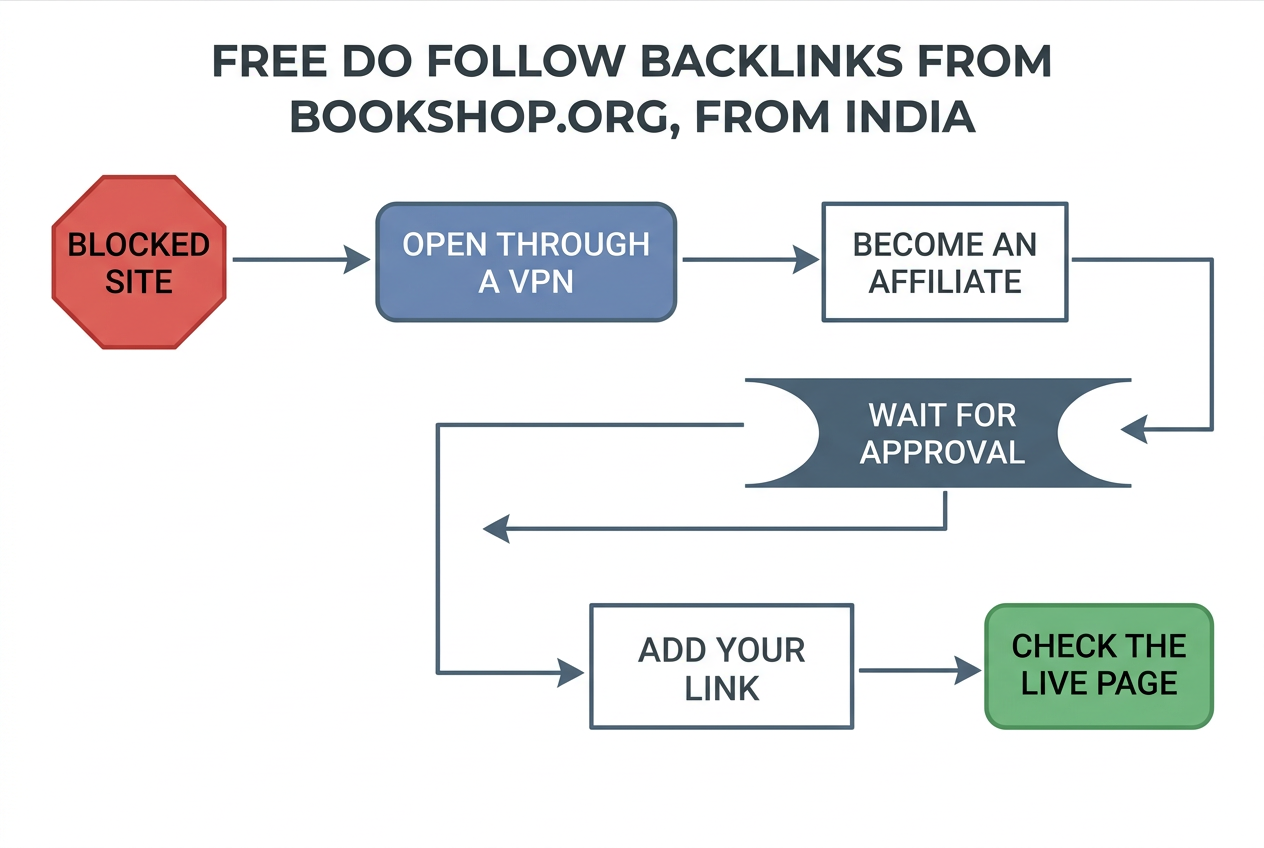
In short: Open bookshop.org through a VPN, join as an affiliate, put your site link in your profile text, and wait 2 to 4 days. Check the live page yourself before you count it.
I share free link-building tricks for marketers, and this is one of them. How do you get a link from a high-DR site when the site won't even open in India? That's what this post answers, and by the end you can sign up, add your link, and check whether it went live.
Why a VPN comes first
Bookshop.org doesn't open directly for me in India. So step one is a VPN, set to a country where the site loads. Any VPN that works will do, and I won't name one because the choice doesn't matter to the method.
Here is the part I can't hand-wave. I read through Bookshop.org's support pages, and none of them says which countries can sign up or anything about VPNs, so the only country detail I found is that the US and UK affiliate programmes are separate and need separate accounts. That is a UK support page, and I read it as a summary. Go and read it yourself.
I can't tell you that signing up through a VPN is fine with them. I can only tell you what I did. Read their affiliate terms before you submit, and put in true details, because the terms copy I found says Bookshop can refuse an applicant and can end an account that doesn't answer when they ask for documents. It was dated April 2020, so check the live version.
The way in: Become an Affiliate
Scroll all the way to the bottom of the page. The link is down there, and it says Become an Affiliate. The same page is listed at bookshop.org/affiliates/profile/introduction, and their support centre points there too when you ask how to become an affiliate. I couldn't open that page from my research tools (it returned a 403), so I can't copy their wording for you. What I can tell you is what I filled in: the form asks for your business details, so enter the real ones.
Bookshop's own help article says the programme is for anyone who wants to support independent bookstores by linking to the platform, and it names authors, publishers, media outlets and bloggers. A business or marketing site is not on that list. Worth knowing before you apply. I'd rather say it than pretend this is a sure thing.
Free do follow backlinks: adding your link once you're approved
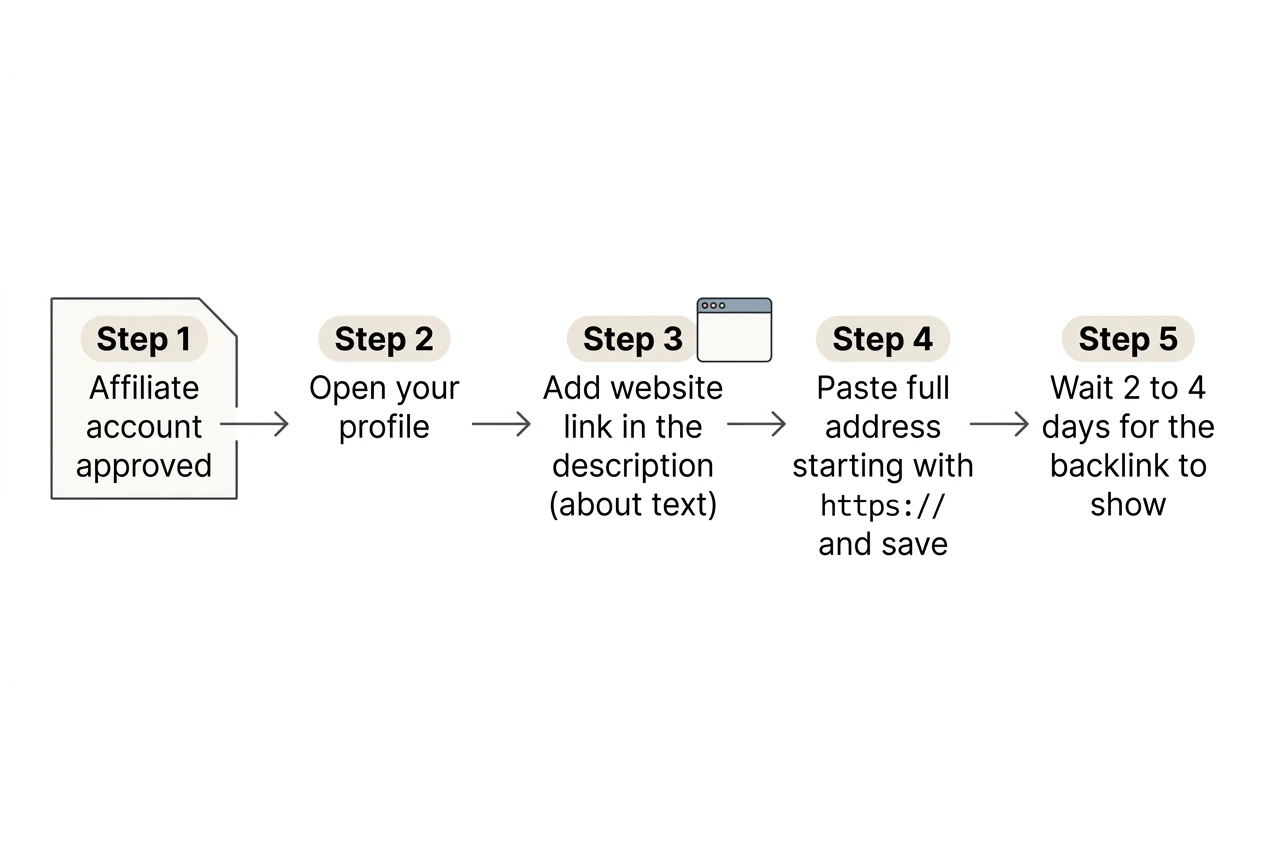
Approval is not instant. It is not guaranteed either. Once your affiliate account is approved, you go to your profile and add your website link in the description.
Bookshop's help article on updating a storefront says you edit things in the Affiliate Profile and Lists section, at bookshop.org/affiliates/profile, and the fields it lists are shop name, storefront URL, about text, images and social links. It does not list a field called "website". That's why I use the description, the about text, as the reel says. Paste the full address, starting with https://, and save.
Then you wait. In my case the backlink showed up in 2 to 4 days. That's what I saw, not a promise from Bookshop.
Is it really a do follow link?
Be careful here, because this is the claim the whole trick rests on. I couldn't confirm it from outside. Bookshop's help pages don't mention the rel attribute, and my research tools can't read raw page code.
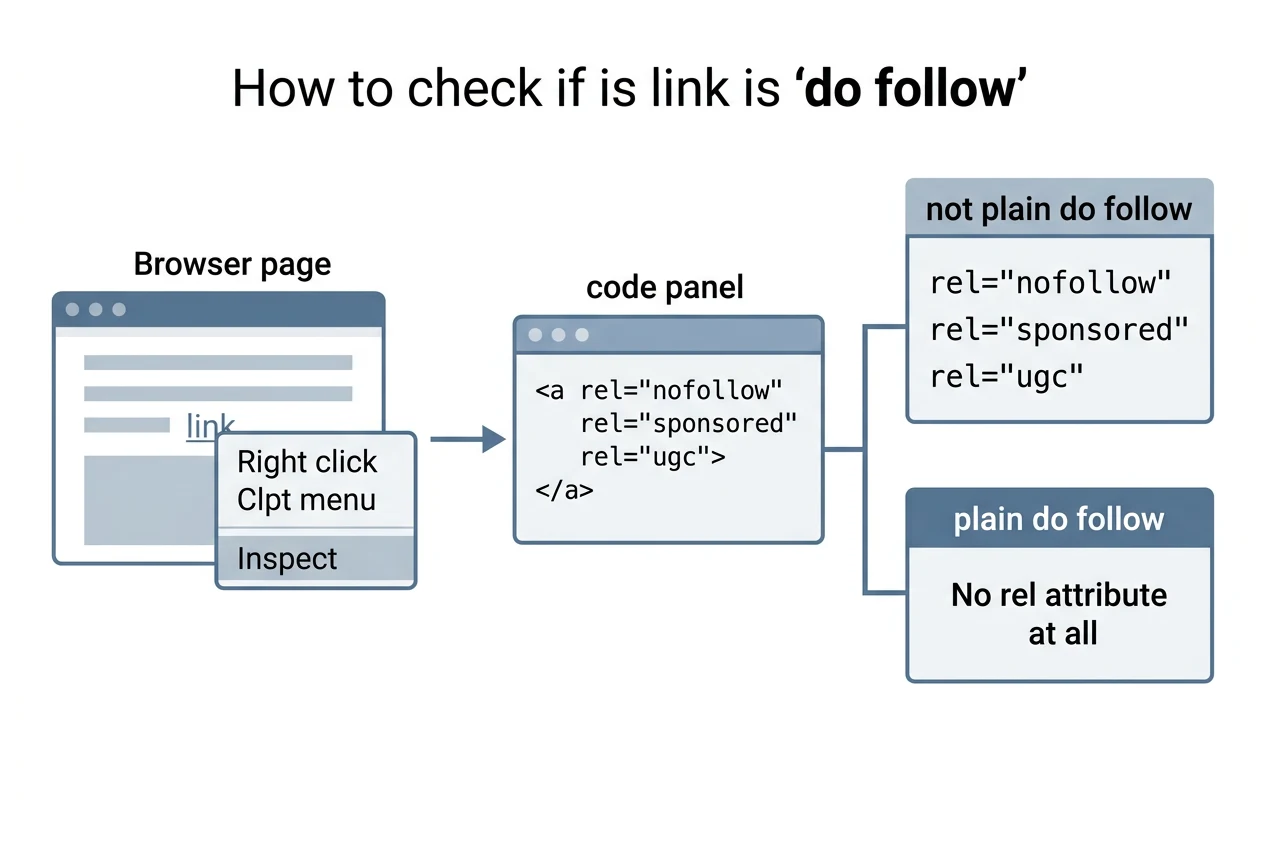
So check it yourself. It takes a minute:
- Open your live affiliate page.
- Right-click your link and choose Inspect.
- Look at the
<a>tag. If it saysrel="nofollow",rel="sponsored"orrel="ugc", it isn't a plain do follow link. If there is no rel attribute at all, it is.
Google's own guidance explains why this matters. It says to mark paid or advertising links as sponsored, links in comments and forum posts as ugc, and anything else you don't want to vouch for as nofollow, and links with those values will generally not be followed. Google's page never mentions profile links or affiliate links by name, so how Bookshop marks yours is their call, not Google's.
About that DR 91
DR 91 is the number I quoted in the reel. Domain Rating is an Ahrefs score for how strong a site's backlinks are. I couldn't re-check it for this post, because Ahrefs' free checker didn't give me a figure for bookshop.org when I tried, so look it up yourself in Ahrefs' free checker before you quote it to a client.
A high DR on the site is not the same as value for your page. It's a score for their domain, and it says nothing about what a link on a profile page does for yours. I won't tell you it lifts rankings or traffic by any amount. I can't know that.
When it doesn't work
Bookshop doesn't publish a list of reasons applications get rejected. I looked. What I found is that accounts go through a verification step, and that you get emails about your status. So here are the checks I'd make, and they are my own, not theirs:
- Use a real business name and a site that loads.
- Answer any email from them quickly, since their terms mention deactivating accounts that don't reply when asked for documents.
- If the link isn't live after a week, check the saved text in your profile before you assume it failed.
- If you're stuck, ask Bookshop's support. Their brochure lists info@bookshop.org.
Bookshop.org hasn't endorsed any of this. It's a method I use, it's their programme, and their rules win.
More like this
There are lots more free do follow links like this on my Blogwriter website. I post the reels on Instagram at koffeewithkishan. Share this blog or the reel with your marketing team.
Keep reading.
Drop your email and the rest of this post opens, along with everything else I write here.
ONE EMAIL, ONCE. NEVER SHARED.
Thanks for reading this far.
I am open to remote growth and Entrepreneur-in-Residence roles in crypto. If any of this was useful, the rest of what I have built is one click away.